


A.X.E v2.0 Advanced Hex Editor
WHAT IS IT?
--------------
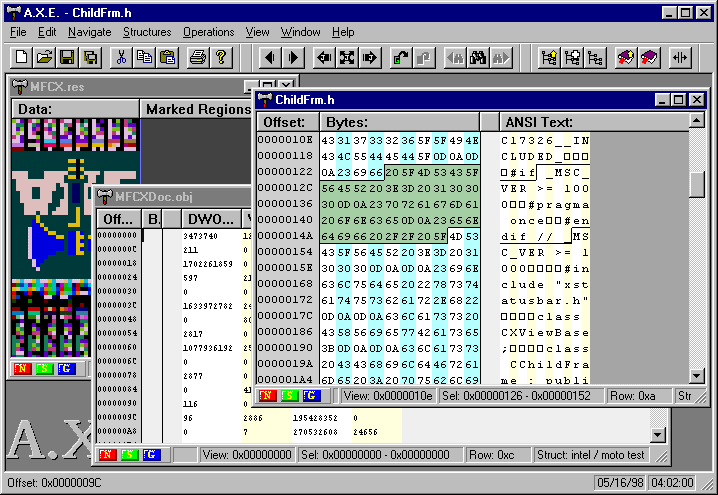
A.X.E. is a Hex Editor for Windows 95/98/NT, offering powerful features and a smooth interface.
The current version of A.X.E. is 2.0.
WHAT SHALL I DO WITH THIS ZIP FILE?
-------------------------------------
The only file you need is AXE.EXE. However, this archive contains the following other
files:
README.TXT You're reading it.
XSTRUCT.INI A structures library for AXE, containing a few example structures.
DOC/*.* HTML documentation with images.
Installation is a simple matter of unzipping the archive (making sure to use the -d switch
in pkunzip, or the 'Use Folder Names' option in WinZip, so that the documentation is unzipped
to the correct directories.
Documentation is at the AXE website in two formats, because you might want either the HTML Help
file or else plain HTML, depending on whether you have Microsoft's HTML Help system on
your computer. To download documentation, updates, etc, please visit
HTTP://WWW.KAHEI.COM
...the AXE website.
DO I HAVE TO PAY ANYTHING?
----------------------------
No. A.X.E. is 'free shareware' -- you must register to get rid of the nag, but registration does
not cost anything (it just reassures me ).
WHO HAS THE COPYRIGHT?
-------------------------
A.X.E. is Copyright © 1998 Benjamin Peterson, except for a part which is Copyright © 1998 Chris Maunder.
A.X.E.'s documentation, graphics, concepts, and for that matter even this readme file are Copyright © 1998 Benjamin Peterson.
A.X.E. may not be redistributed commercially without the express permission of the author. It may not be
modified.
HOW CAN I CONTACT THE AUTHOR?
--------------------------------
Mail: kahei@kahei.com
Wweb page (check it!): http://www.kahei.com
What does an A.X.E. bookmark consist of?
An A.X.E. bookmark has the following attributes:
OFFSET: Where in the document the bookmark is set. If you insert bytes before a bookmark, the bookmark's offset will change so that it is still placed on the same data as before.
NAME: The name of the bookmark.
STRUCTURE: May be blank. If not blank, then this is the name of a structure associated with the bookmark.
LINELENGTH: May be blank. If not, then this is the number of bytes-per-row with which the data at the bookmark is to be displayed.
WHAT IS IT?
--------------
A.X.E. is a Hex Editor for Windows 95/98/NT, offering powerful features and a smooth interface.
The current version of A.X.E. is 2.0.
WHAT SHALL I DO WITH THIS ZIP FILE?
-------------------------------------
The only file you need is AXE.EXE. However, this archive contains the following other
files:
README.TXT You're reading it.
XSTRUCT.INI A structures library for AXE, containing a few example structures.
DOC/*.* HTML documentation with images.
Installation is a simple matter of unzipping the archive (making sure to use the -d switch
in pkunzip, or the 'Use Folder Names' option in WinZip, so that the documentation is unzipped
to the correct directories.
Documentation is at the AXE website in two formats, because you might want either the HTML Help
file or else plain HTML, depending on whether you have Microsoft's HTML Help system on
your computer. To download documentation, updates, etc, please visit
HTTP://WWW.KAHEI.COM
...the AXE website.
DO I HAVE TO PAY ANYTHING?
----------------------------
No. A.X.E. is 'free shareware' -- you must register to get rid of the nag, but registration does
not cost anything (it just reassures me
).WHO HAS THE COPYRIGHT?
-------------------------
A.X.E. is Copyright © 1998 Benjamin Peterson, except for a part which is Copyright © 1998 Chris Maunder.
A.X.E.'s documentation, graphics, concepts, and for that matter even this readme file are Copyright © 1998 Benjamin Peterson.
A.X.E. may not be redistributed commercially without the express permission of the author. It may not be
modified.
HOW CAN I CONTACT THE AUTHOR?
--------------------------------
Mail: kahei@kahei.com
Wweb page (check it!): http://www.kahei.com
What does an A.X.E. bookmark consist of?
An A.X.E. bookmark has the following attributes:
OFFSET: Where in the document the bookmark is set. If you insert bytes before a bookmark, the bookmark's offset will change so that it is still placed on the same data as before.
NAME: The name of the bookmark.
STRUCTURE: May be blank. If not blank, then this is the name of a structure associated with the bookmark.
LINELENGTH: May be blank. If not, then this is the number of bytes-per-row with which the data at the bookmark is to be displayed.