


iMageStudio for PlayStation 2
With its ultimate color reduction engine, iMageStudio is recognized as must-have tool among leading graphic artists. Especially in video game filed, it is a de facto standard tool for creating optimal image data for various platforms such as PSX, PlayStation2, NINTENDO GAMECUBE, GAMEBOY ADVANCE, DirectX and Xbox.
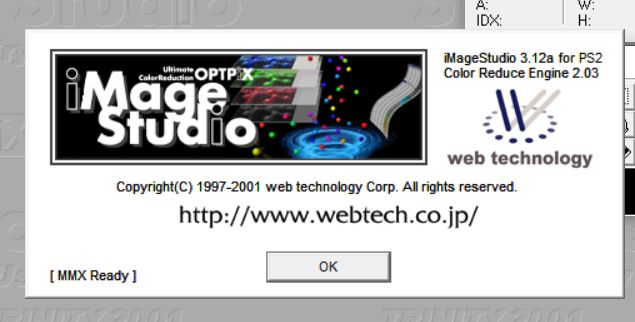
You can create index color image from full color (direct color) image with minimum quality loss. For platforms supporting alpha channel, you can even create index color image containing alpha value.
Intuitive user interface of iMageStudio let you edit the palette (CLUT) data swiftly and flexibly. Macro function enables you to process bunch of image files as a batch job.
Once you touch the iMageStudio, you can't do without it forever!
iMageStudio for PS2 is the tool you ever waited. Saving time&money AND PS2 optimal image creation can be realized by only one tool.
Color reduction with alpha channel, flexible palette handling, pixel editing, extendable macros, instant image preview on PS2 development tool, ... etc., with these features iMageStudio is must have tool for PS2 game development. Once you touch iMageStudio, you will be the wizard of PS2 image creation.
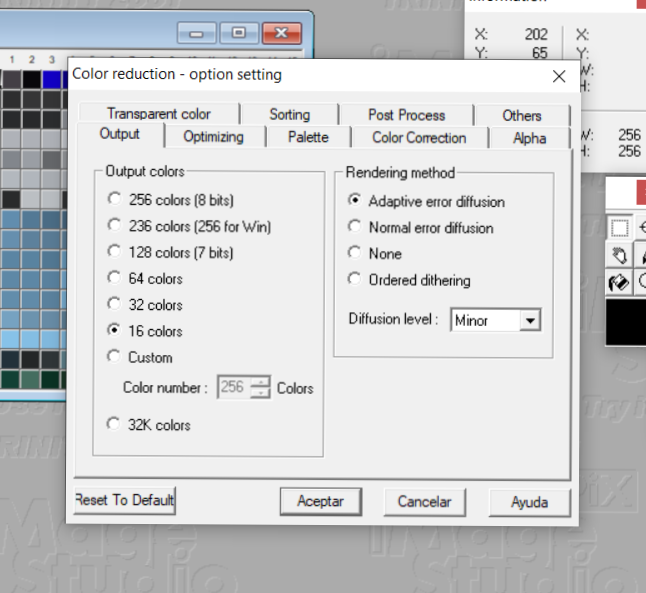
Excellent Color Reduction Functions for Character Map generation (16 colors x 16 palettes),
Color Reduction Engine and Color Equalizer optimized for "GAMEBOY ADVANCE" (GBA),
Full of Excellent Color Reduction Functions for Character Map generation
Newly developed iMageStudio Color Reduction Engine for Character Map (16 colors x 16 palettes), the essential for GAMEBOY ADVANCE, will never lose the image quality and your satisfaction.
This eagerly-awaited function realizes instant "Character Map" creation without your effort from full color image.
iMageStudio favorites, "Error Diffusion" and "Color Equalizer" are also executable with this explicit function.
GBA Optimized "Color Reduction Engine" and "Color Equalizer"
Due to the difference of color appearances between PC monitor and GBA display, even the same image data looks quite different on them. You always have to concern the differences when editing images. Sometimes releasing date of your video game might be delayed in order to revise bunch of image files for resolving the color difference.
Color Equalizer optimized for GBA solves all these problems for you. The engine knows the color difference and automatically resolves the difference.
Instant image preview on GBA development tools
Graphic artists particular about color may want to view the real appearance on GBA LCD. With the "Remote Display" function, you can preview the image you are just editing on iMageStudio on GBA development tools (hardware). No need for passing the image data to your programmer and saving the image data ever! Image preview on GBA development tool is on the fly from iMageStudio!
Substantial S3TC Exclusive Image Editing Functions
Only iMageStudio can offer solid editing functions specially for S3TC format image.
Together with S3TC Conversion Functions, S3TC format image creation will complete on iMageStudio alone!
Ultimate Color Reduction in various NGC formats (e.g. RGB5A3)
iMageStudio's ultimate color reduction engine allows you to reduce the image color depth to 256 colors or less without suffering picture's quality. This de fact standard engine also supports various formats exclusively for NGC such as RGB5A3.
NGC Exclusive Color Equalizer
"NGC Color Equalizer" alters uniqueness of TV monitor and CRT monitor, and characteristics of human visual sensory recognition to balance the color palette. As a result, the color displayed on PC monitor and TV monitor will be equalized in their colors.
iMageStudio's "NGC Color Equalizer" functions to optimize color reduction engine and image conversion, etc.
Xbox Exclusive Color Equalizer
"Xbox Color Equalizer" alters uniqueness of TV monitor and CRT monitor, and characteristics of human visual sensory recognition to balance the color palette. As a result, the color displayed on PC monitor and TV monitor will be equalized in their colors.
iMageStudio's "Xbox Color Equalizer" functions to optimize color reduction engine and image conversion, etc.
Ultimate Color Reduction Engine
With award winning color reduction engine, iMageStudio realizes to create color reduction results of color depth to 256 colors or even less from full color images in ultra high color quality. We are sure that your audience will not notice or care of you applied color reduction over your works.
Enhanced Palette Management
iMageStudio has been developed may useful functions to meet your request; distinguishing pixels mapped to certain palette entry by blinking the pixels, fill palette area with gradation color, move selected palette entries to different location, and so forth.
Image Editing
While featuring many useful image editing functions, imageStudio supports creating and editing "Layer Structure" and "Alpha Channel", which are now indispensable for all high level image creation.
web site:
- http://www.optpix.com/ (English)
- http://www.webtech.co.jp/istudio/ (Japanese)
Nota: Esta excelente herramienta permite crear imágenes especialmente para juegos de psx, ps2, nintendo, gameboy...
porque es tan util? permite la configuracion y rediccion de colores en diferentes fortmatos
practicamente es una tool mas optima para desarrollar imagenes para estas consolas, permitiendo configurar Pixeles, Colores de profundidad, Bites, todos estas setting se pueden personalizar con este programa, mas con los tradicionales como Photoshop, es un Lio... es una herramienta especial para desarrollar juegos, esta personalizado para conectar a la PS2 via LAN or Debbugin via USBLink.
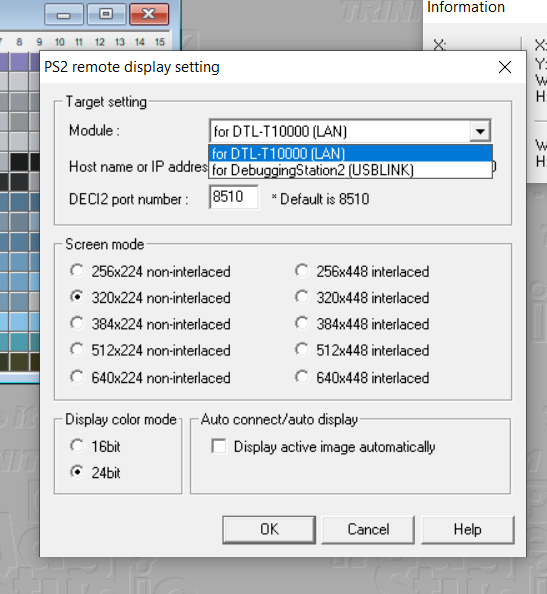
[download] Download: [/download] ---> iMageStudio for PlayStation 2
Ejemplo de testeo con PESO y Calidad de FOTOS
En las siguientes imágenes pongo el formato, el peso y el programa con el que fue creado las imagenes de testeo.
Observen como queda de pequeño el peso de la imagen con el programa a 32 Kbits con OPTPiX_iMageStudio

Ejemplo de Testeo con OPTPiX_iMageStudio:
1. Imagen en formato .JPG (575 KBytes) RGB Photoshop

2. Imagen en formato .PNG (40 KBytes) 16 Bits
OPTPiX

3. Imagen en formato .PNG (22 KBytes) 32 KBytes
OPTPiX

Concluciones:
- Como podemos observar en las imagenes de arriba, el formato de Photoshop RGB es el mas pesado (Imagen 1)
- El Formato trabajado con OPTPiX_iMageStudio a 16 Bytes con Tecnologia OPTPiX_iMageStudio dio un mejor resultado al pesar menos y tener mejor calidad de Colores (Imagen 2)
- El Formato trabajado con OPTPiX_iMageStudio a 32 KBytes con Tecnologia OPTPiX_iMageStudio dio un EXCELENTE y MEJOR resultado al pesar menos y tiene mejor calidad de Colores (Imagen 3)
Impresionante Editor de Imagenes :big_boss: :alter_mann:
:git: :git:

With its ultimate color reduction engine, iMageStudio is recognized as must-have tool among leading graphic artists. Especially in video game filed, it is a de facto standard tool for creating optimal image data for various platforms such as PSX, PlayStation2, NINTENDO GAMECUBE, GAMEBOY ADVANCE, DirectX and Xbox.
You can create index color image from full color (direct color) image with minimum quality loss. For platforms supporting alpha channel, you can even create index color image containing alpha value.
Intuitive user interface of iMageStudio let you edit the palette (CLUT) data swiftly and flexibly. Macro function enables you to process bunch of image files as a batch job.
Once you touch the iMageStudio, you can't do without it forever!
iMageStudio for PS2 is the tool you ever waited. Saving time&money AND PS2 optimal image creation can be realized by only one tool.
Color reduction with alpha channel, flexible palette handling, pixel editing, extendable macros, instant image preview on PS2 development tool, ... etc., with these features iMageStudio is must have tool for PS2 game development. Once you touch iMageStudio, you will be the wizard of PS2 image creation.
Excellent Color Reduction Functions for Character Map generation (16 colors x 16 palettes),
Color Reduction Engine and Color Equalizer optimized for "GAMEBOY ADVANCE" (GBA),
Full of Excellent Color Reduction Functions for Character Map generation
Newly developed iMageStudio Color Reduction Engine for Character Map (16 colors x 16 palettes), the essential for GAMEBOY ADVANCE, will never lose the image quality and your satisfaction.
This eagerly-awaited function realizes instant "Character Map" creation without your effort from full color image.
iMageStudio favorites, "Error Diffusion" and "Color Equalizer" are also executable with this explicit function.
GBA Optimized "Color Reduction Engine" and "Color Equalizer"
Due to the difference of color appearances between PC monitor and GBA display, even the same image data looks quite different on them. You always have to concern the differences when editing images. Sometimes releasing date of your video game might be delayed in order to revise bunch of image files for resolving the color difference.
Color Equalizer optimized for GBA solves all these problems for you. The engine knows the color difference and automatically resolves the difference.
Instant image preview on GBA development tools
Graphic artists particular about color may want to view the real appearance on GBA LCD. With the "Remote Display" function, you can preview the image you are just editing on iMageStudio on GBA development tools (hardware). No need for passing the image data to your programmer and saving the image data ever! Image preview on GBA development tool is on the fly from iMageStudio!
Substantial S3TC Exclusive Image Editing Functions
Only iMageStudio can offer solid editing functions specially for S3TC format image.
Together with S3TC Conversion Functions, S3TC format image creation will complete on iMageStudio alone!
Ultimate Color Reduction in various NGC formats (e.g. RGB5A3)
iMageStudio's ultimate color reduction engine allows you to reduce the image color depth to 256 colors or less without suffering picture's quality. This de fact standard engine also supports various formats exclusively for NGC such as RGB5A3.
NGC Exclusive Color Equalizer
"NGC Color Equalizer" alters uniqueness of TV monitor and CRT monitor, and characteristics of human visual sensory recognition to balance the color palette. As a result, the color displayed on PC monitor and TV monitor will be equalized in their colors.
iMageStudio's "NGC Color Equalizer" functions to optimize color reduction engine and image conversion, etc.
Xbox Exclusive Color Equalizer
"Xbox Color Equalizer" alters uniqueness of TV monitor and CRT monitor, and characteristics of human visual sensory recognition to balance the color palette. As a result, the color displayed on PC monitor and TV monitor will be equalized in their colors.
iMageStudio's "Xbox Color Equalizer" functions to optimize color reduction engine and image conversion, etc.
Ultimate Color Reduction Engine
With award winning color reduction engine, iMageStudio realizes to create color reduction results of color depth to 256 colors or even less from full color images in ultra high color quality. We are sure that your audience will not notice or care of you applied color reduction over your works.
Enhanced Palette Management
iMageStudio has been developed may useful functions to meet your request; distinguishing pixels mapped to certain palette entry by blinking the pixels, fill palette area with gradation color, move selected palette entries to different location, and so forth.
Image Editing
While featuring many useful image editing functions, imageStudio supports creating and editing "Layer Structure" and "Alpha Channel", which are now indispensable for all high level image creation.
web site:
- http://www.optpix.com/ (English)
- http://www.webtech.co.jp/istudio/ (Japanese)
Nota: Esta excelente herramienta permite crear imágenes especialmente para juegos de psx, ps2, nintendo, gameboy...
porque es tan util? permite la configuracion y rediccion de colores en diferentes fortmatos
practicamente es una tool mas optima para desarrollar imagenes para estas consolas, permitiendo configurar Pixeles, Colores de profundidad, Bites, todos estas setting se pueden personalizar con este programa, mas con los tradicionales como Photoshop, es un Lio... es una herramienta especial para desarrollar juegos, esta personalizado para conectar a la PS2 via LAN or Debbugin via USBLink.
[download] Download: [/download] ---> iMageStudio for PlayStation 2
Ejemplo de testeo con PESO y Calidad de FOTOS
En las siguientes imágenes pongo el formato, el peso y el programa con el que fue creado las imagenes de testeo.
Observen como queda de pequeño el peso de la imagen con el programa a 32 Kbits con OPTPiX_iMageStudio
Ejemplo de Testeo con OPTPiX_iMageStudio:
1. Imagen en formato .JPG (575 KBytes) RGB Photoshop
2. Imagen en formato .PNG (40 KBytes) 16 Bits
OPTPiX
3. Imagen en formato .PNG (22 KBytes) 32 KBytes
OPTPiX
Concluciones:
- Como podemos observar en las imagenes de arriba, el formato de Photoshop RGB es el mas pesado (Imagen 1)
- El Formato trabajado con OPTPiX_iMageStudio a 16 Bytes con Tecnologia OPTPiX_iMageStudio dio un mejor resultado al pesar menos y tener mejor calidad de Colores (Imagen 2)
- El Formato trabajado con OPTPiX_iMageStudio a 32 KBytes con Tecnologia OPTPiX_iMageStudio dio un EXCELENTE y MEJOR resultado al pesar menos y tiene mejor calidad de Colores (Imagen 3)
Impresionante Editor de Imagenes :big_boss: :alter_mann:
:git: :git:
Winning Eleven & ProEvolutionSoccer & FIFA EA Sports |Option Files|