


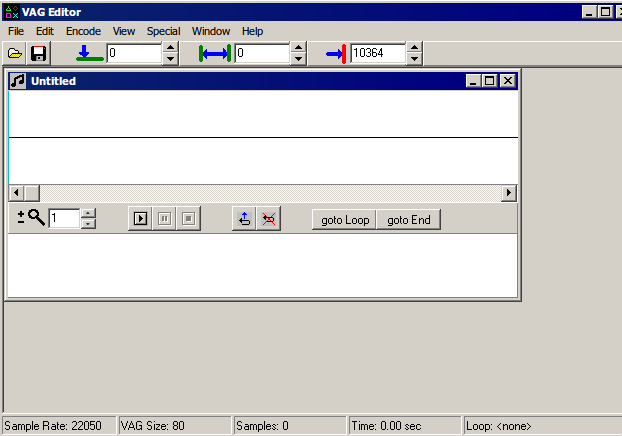
VAG Editor 1.0
This is a new tool for converting WAV, RAW and VAG files
and accurately adjusting sample data to change loop points.
Basic features:
1) Edit loop points.
2) Visual display of samples and 28 sample boundaries.
3) Conversion between RAW, WAV and VAG
4) Preview of sound on SoundBlaster card.
5) Cut and Paste samples over clipboard.
Creating Sound Data
The following figure shows the processing steps from sound capture through creation of XA sound data.
Sound Data Creation Procedure
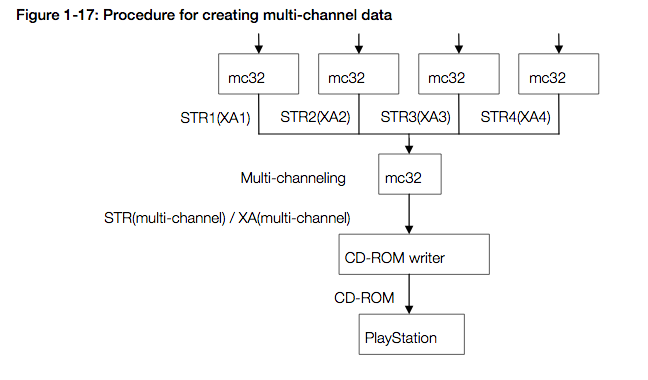
Sound data captured from a suitable tool is stored in WAV or PCM (16-bit) format and is converted to XAsound using mc32.
The conversion can also be performed using the sound artist tool RAW2XA. Theresulting XA sound data is then converted to multiple channels using mc32. Finally, a CD-ROM writer isused to burn the data onto a CD-ROM.
The sound data will not play back correctly if it is burned directlyonto the CD-ROM without first being converted to multiple channels. The conversion of XA sound using mc32 is explained in the following subsection. For information on how toburn a CD-ROM using a CD-ROM writer, refer to the subsection entitled “Burning Streaming Data into aCD-ROM.”
Note that sound data to be converted (WAV, PCM) must have a sample length of 16 bits.In the following section, window functions are only briefly discussed. For more detailed information, refer tothe section entitled "mc32 Operation."
1. Start up mc32Launch mc32.
When mc32 starts up, the Conversion window will open automatically.
2. Set up the Conversion windowIn the Conversion window,
set the input filename, input format, and the output filename. Specify XA forthe output format.
3. Set up the XA Parameters windowIn the XA Parameters window,
set stereo or monaural mode and the frequency of the output XA sound.If the frequency of the input XA sound differs from the specified output frequency, the frequency will beconverted automatically.
4. Convert the soundPerform the conversion in the Conversion window.
Press the Cancel button to cancel the conversion
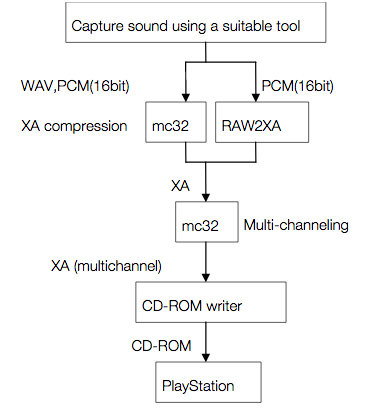
Creating Multichannel Data
Multichannel Streaming
Multichannel streaming is a streaming format used to interleave multiple streams of data on a CD-ROM. Inordinary streaming, one stream of data occupies contiguous regions on the CD-ROM. In multichannelstreaming, however, multiple channels are interleaved in contiguous regions on the CD-ROM. Each channelis given a channel number, so it is possible to play only a specific channel during playback.
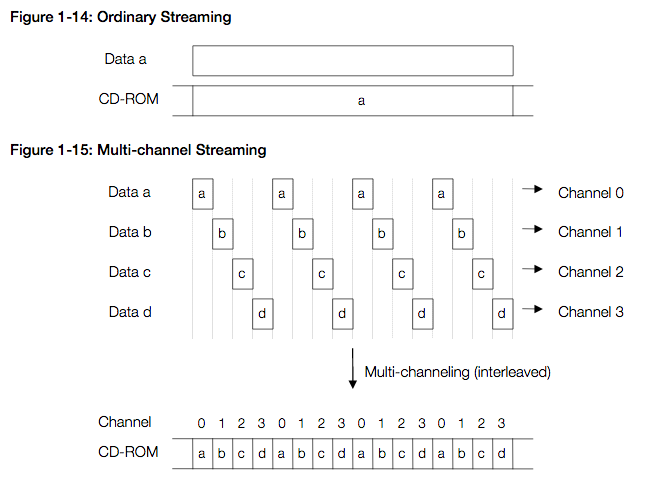
Multichannel streaming has some important advantages:
CD-ROM storage can be used efficiently, andplayback data can be switched at high speed
multichannel streaming, this space contains other streaming data. Consequently, multichannel streamingcan use CD-ROM storage more efficiently than ordinary Streaming
[download] Download [/download] ---> Deste este VAG Editor 1.0
Referencias:
This is a new tool for converting WAV, RAW and VAG files
and accurately adjusting sample data to change loop points.
Basic features:
1) Edit loop points.
2) Visual display of samples and 28 sample boundaries.
3) Conversion between RAW, WAV and VAG
4) Preview of sound on SoundBlaster card.
5) Cut and Paste samples over clipboard.
Creating Sound Data
The following figure shows the processing steps from sound capture through creation of XA sound data.
Sound Data Creation Procedure
Sound data captured from a suitable tool is stored in WAV or PCM (16-bit) format and is converted to XAsound using mc32.
The conversion can also be performed using the sound artist tool RAW2XA. Theresulting XA sound data is then converted to multiple channels using mc32. Finally, a CD-ROM writer isused to burn the data onto a CD-ROM.
The sound data will not play back correctly if it is burned directlyonto the CD-ROM without first being converted to multiple channels. The conversion of XA sound using mc32 is explained in the following subsection. For information on how toburn a CD-ROM using a CD-ROM writer, refer to the subsection entitled “Burning Streaming Data into aCD-ROM.”
Note that sound data to be converted (WAV, PCM) must have a sample length of 16 bits.In the following section, window functions are only briefly discussed. For more detailed information, refer tothe section entitled "mc32 Operation."
1. Start up mc32Launch mc32.
When mc32 starts up, the Conversion window will open automatically.
2. Set up the Conversion windowIn the Conversion window,
set the input filename, input format, and the output filename. Specify XA forthe output format.
3. Set up the XA Parameters windowIn the XA Parameters window,
set stereo or monaural mode and the frequency of the output XA sound.If the frequency of the input XA sound differs from the specified output frequency, the frequency will beconverted automatically.
4. Convert the soundPerform the conversion in the Conversion window.
Press the Cancel button to cancel the conversion
Creating Multichannel Data
Multichannel Streaming
Multichannel streaming is a streaming format used to interleave multiple streams of data on a CD-ROM. Inordinary streaming, one stream of data occupies contiguous regions on the CD-ROM. In multichannelstreaming, however, multiple channels are interleaved in contiguous regions on the CD-ROM. Each channelis given a channel number, so it is possible to play only a specific channel during playback.
Multichannel streaming has some important advantages:
CD-ROM storage can be used efficiently, andplayback data can be switched at high speed
multichannel streaming, this space contains other streaming data. Consequently, multichannel streamingcan use CD-ROM storage more efficiently than ordinary Streaming
[download] Download [/download] ---> Deste este VAG Editor 1.0
Quote:Winning Eleven
En 1996, tras el éxito International Superstar Soccer Deluxe, Konami decidió crear otro título de fútbol pero no con la misma gente, así se le entregó el trabajo a Konami Computer Entertainment Tokyo quienes Crearon: World Soccer Winning Eleven, conocido como Goal Storm en Europa y Norteamérica. El mismo dio comienzo a una saga completamente ajena a International Superstar Soccer, a pesar de que varios de los títulos de la nueva franquicia llevan los mismos nombres que ésta.
Al año siguiente salió a la venta Winning Eleven 97 (llamado International Superstar Soccer Pro en Europa y Goal Storm 97 en Norteamérica. La saga continuó con Winning Eleven 3 y Winning Eleven 4 ( llamados en el resto del mundo como International Superstar Soccer Pro 98 y International Superstar Soccer Pro Evolution, respectivamente ). En marzo de 2001, antes de la aparición de la quinta edición de Winning Eleven, salió a la venta International Superstar Soccer Pro Evolution 2, siendo éste la segunda parte de ISS Pro Evolution (en Japón, World Soccer Jikkyou Winning Eleven 2000: U-23 Medal Heno Chousen) y el último Winning Eleven conocido como ISS fuera del país asiático, ya que en octubre del mismo año se lanzó Winning Eleven 5 para PlayStation 2, que sería titulado en Europa como Pro Evolution Soccer, iniciando una nueva franquicia que persiste hasta la fecha. Cabe destacar que Winning Eleven 2002 salió solamente en Japón y Europa para PlayStation, en el viejo continente seria conocido como Pro Evolution Soccer 2 y que seria el último título en dicho sistema.
Winning Eleven 2002

Referencias:
- Winning Eleven 2002 - Rom Hacking [ Facebook ]
- ZonaWe [ Foros ]
- WeLegendss [ Facebook ]
Winning Eleven & ProEvolutionSoccer & FIFA EA Sports |Option Files|


