
+- Winning Eleven Pro Evolution Soccer (https://we11world.com)
+-- Forum: Winning Eleven & Pro Evolution Soccer (https://we11world.com/forum-1.html)
+--- Forum: Archived Forums | Audio | Kits | Video | Estadios (https://we11world.com/forum-3.html)
+---- Forum: Programas de Edición | PS2 | PS3 | PSP | PS4 | PC (https://we11world.com/forum-18.html)
+---- Thread: Tutorial Teamsave Creator v.0.4 by Reachi (/thread-8873.html)
Teamsave Creator v.0.4 by Reachi - we11world - 02-19-2021
Teamsave Creator v.0.4 by Reachi
What is Teamsave Creator (TC)?
- It's Tool that write datas from txt files in the League/Team folders into a decrypted Teamsave and copy this to your save folder.
- It create the map.txt path for the Kits, Boots, Face and Hair from each Team + ID's generation too + writting all into the uni/face/hair/ map.txt
- TC collect all datas from each League, Team and Player.
- TC show all files that insert in him at the Team and Player Selection
Teams
In the League folders are the Team folders. This folders contains all files that are special for this Team and the foldername will be the Teamname ingame.
[b]Folders: Banner / Chants / Kits / Player
Pictures[/b]: Emblem / SB
TXT: Team
Banner: Contains a png file with a size of 256x256 which named "Unknown"
Chants: Contains 5 Chants (ADX) which named "Chant1", "Chant2", "Chant3", "Chant4" and "Chant5"
Kits: Contains the Kits from this Team. It's needed for the preview pics. The Tool will check if you have them in your UNI + Copy them if not.
Team.txt: Now we get to the first very important point of this Tool. First look, how it must look like.
Quote:Letters: LPN
Stadium-Path: POL - Stadion Miejski
Formation: 4-4-2
X-Rotation Player2: 10
Y-Rotation Player2: 65
X-Rotation Player3: 10
Y-Rotation Player3: 39
X-Rotation Player4: 12
Y-Rotation Player4: 90
X-Rotation Player5: 12
Y-Rotation Player5: 14
X-Rotation Player6: 22
Y-Rotation Player6: 38
X-Rotation Player7: 25
Y-Rotation Player7: 61
X-Rotation Player8: 28
Y-Rotation Player8: 83
X-Rotation Player9: 29
Y-Rotation Player9: 20
X-Rotation Player10: 41
Y-Rotation Player10: 62
X-Rotation Player11: 42
Y-Rotation Player11: 42
Position 1: 1
Position 2: 2
Position 3: 3
Position 4: 4
Position 5: 5
Position 6: 6
Position 7: 7
Position 8: 8
Position 9: 9
Position 10: 10
Position 11: 11
Position 12: 12
Position 13: 13
Position 14: 14
Position 15: 15
Position 16: 16
Position 17: 17
Position 18: 18
Position 19: 19
Position 20: 20
Position 21: 21
Position 22: 22
Position 23: 23
Position 24: 24
Position 25: 25
Position 26: 26
Position 27: 27
Position 28: 28
Position 29: 29
Position 30: 30
Position 31: 31
Position 32: 32
FK-L: 1
FK-S: 2
CK-L: 3
CK-R: 4
PK: 5
CP: 6
Back Line: B
Offside Trap: B
Fan Color 1: Red
Fan Color 2: Red
Player
The folder Player is in the Team folder and contains all Players that are in this Team with all Player datas.
The folders must have the full name from the Player. This name will be showen later in the Tool. The Tool autom. reads all of this Player folders. These Player folders contains this things:
Folders: Boots / FaceHair
jpg: Pic
txt: Stats
Boots: This folder contains the Boots for this Player. The file must be named "Boots"! A preview will be showen too in the Basic Settings screen.
FaceHair: The folder contains the Face Hair from this Player. The Name from this files must be for the Face "Face" and for the Hair "Hair". There's a pic.png too. This is only for preview the picture if you like. You see them then the Basic Settings screen. It must be a "png" file named "Pic" with a size of 100x130, Tool resize smaller/bigger files, in this FaceHair folder.
Pic: This is a real picture of the Player (I got mine from transfermarkt.de). It must be a "jpg" file named "Pic" with a size of 100x130, Tool resize smaller/bigger files. You see the picture at the Basic Settings screen.
Stats: Now we are at the most important point. Every Player must have a Stats.txt that look like
INSTALL
1. Download the "Teamsave Creator v.0.4.rar" and put the extract folder into your PES6 main folder.
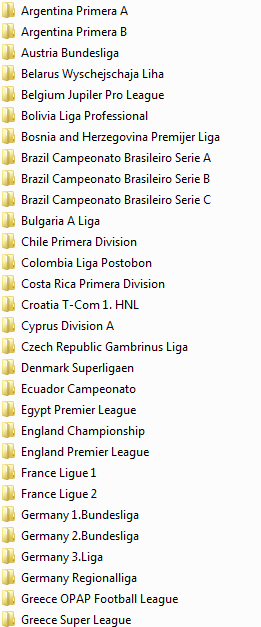
2. Download one of the League folders and put the extract folder into the Teamsave Creator folder.
3. Make a backup from your "boots", "faces", "hairs" and "uni" AND copy THIS new folder instead of them into your GDB folder.
4. Run the Tool and press the Tab "Other"
- Check your Exe and if the Checksume and Cryptioning is enable then disable them. ATTENTION: After Disable this two things, PES6 cant't read the normal crypted OF. Now it can only read and write encrypted. => Make a backup from your optionfile!
- Go to "PES Save Path" and Press "Change". Now select your "save" folder from PES6 (C:\Users\XY\Documents\KONAMI\Pro Evolution Soccer 6\save)
- Go to "PES Language" and chose your language. Press "Set" to Save.
5. Before you press "Save" you must press on the first League!
[download] Download [/download] --- Desde aca PES6 Team Save Creator

Para mas Programas Tools by Reachi
- Teamsave Creator by Reachi
- Hidden Player Editor by Rechi
- Team-Position Editor by Rechi
- Chants Relink Toolby by Rechi
- National-Team Emblem Editor by Rechi
- Trophy Selector by Rechi
- Scoreboard Editor by Rechie
 :alter_mann:
